From AI Agent Demo to Production System: A Full-Stack Blueprint
A production AI agent is not “an LLM with tools.” It is a full product and infrastructure stack wrapped around a model. The model reasons, but the product must manage identity, permissions, durable state, memory, tool execution, safety, cost, observability, evaluation, data, and recovery from failure.
The cleanest production mental model is:
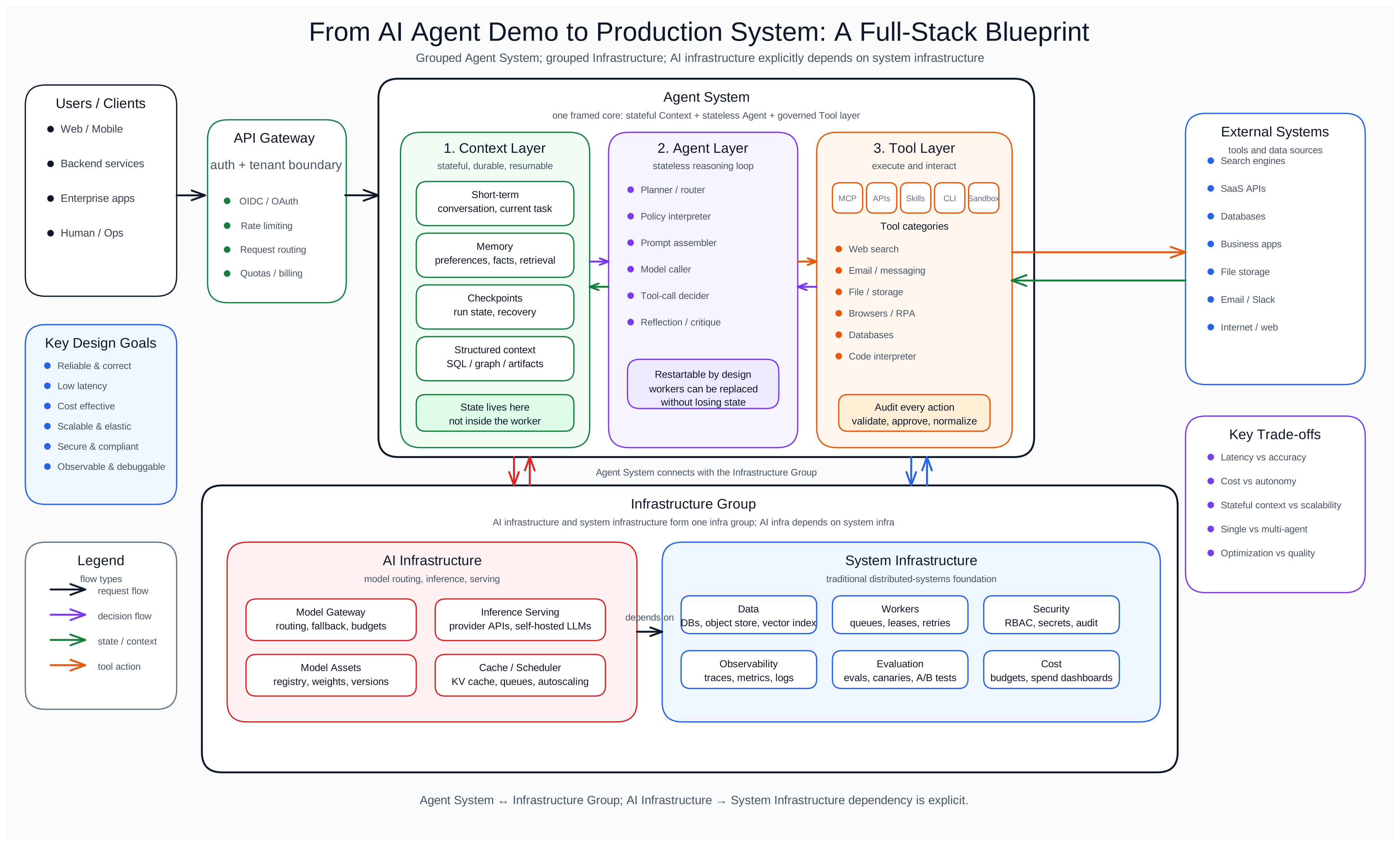
The most important design principle is this:
The agent runtime should be stateless. The context layer should be stateful, durable, and resumable.
The agent loop can be killed, restarted, scaled horizontally, or replaced with a better model. The context layer is the system of record. It owns conversation state, workflow state, memory, checkpoints, artifacts, tool results, human approvals, and recovery metadata.
That separation is what turns agents from demos into production systems.
1. What an Agent Product Actually Is
An agent product is the user-facing service that lets a human, system, or another agent delegate work to an AI system.
It may look like a chat app, but the product surface can be many things:
User Interface / Product Surface
├── Web app
├── Mobile app
├── Desktop app
├── Voice chat UI
├── Terminal UI
├── CLI
├── API
├── Webhook endpoint
├── Slack / Teams bot
├── IDE assistant
├── Browser extension
├── Background worker
└── MCP-facing app or server
The user interface is not just presentation. It defines what kind of agency the system can safely support.
These surfaces do not require different agents behind the scenes. A web app, CLI, voice interface, Slack bot, and API can all connect to the same durable agent runtime, context layer, tool layer, memory system, and run lifecycle.
What changes is the experience contract.
Different interfaces have different input affordances, output modalities, latency expectations, interruption patterns, and user attention budgets. The same agent should therefore be configurable by channel.
For example:
- Web chat UI: supports long responses, tables, diagrams, images, citations, collapsible tool traces, and rich artifact previews.
- Voice UI: should usually produce short, direct responses because users cannot easily scan, reread, or remember long spoken output.
- CLI: should prefer concise text, file paths, diffs, logs, exit codes, and optional machine-readable output.
- API: should return structured status and data, not conversational prose.
The product surface is an adapter between the same agent and the user’s current interaction mode.
A serious agent product usually needs at least five user-facing capabilities.
- Task submission. A user should be able to give the agent a goal, context, constraints, files, credentials, or references.
- Progress visibility. Users need to see whether the agent is planning, waiting on a tool, blocked, asking for approval, recovering from failure, or done.
- Control. Users should be able to pause, resume, cancel, edit instructions, approve dangerous actions, deny tool calls, or take over.
- Trust. The UI should show what the agent did, what data it used, what tools it called, and what changed externally.
- Memory controls. Users should be able to inspect, correct, delete, pin, or scope memories.
The product surface is where agency becomes usable.
A good agent interface does not simply say:
The agent is thinking...
It says:
Current run: Drafting customer renewal plan
Status: Waiting for Salesforce read permission
Last action: Retrieved account notes
Next proposed action: Send email draft to customer success manager
Requires approval: Yes
Estimated cost so far: $0.08
That is the difference between a chatbot and an agentic product.
2. The Core Architecture: Context, Agent, Tool
The core agent system should be divided into three clean layers.
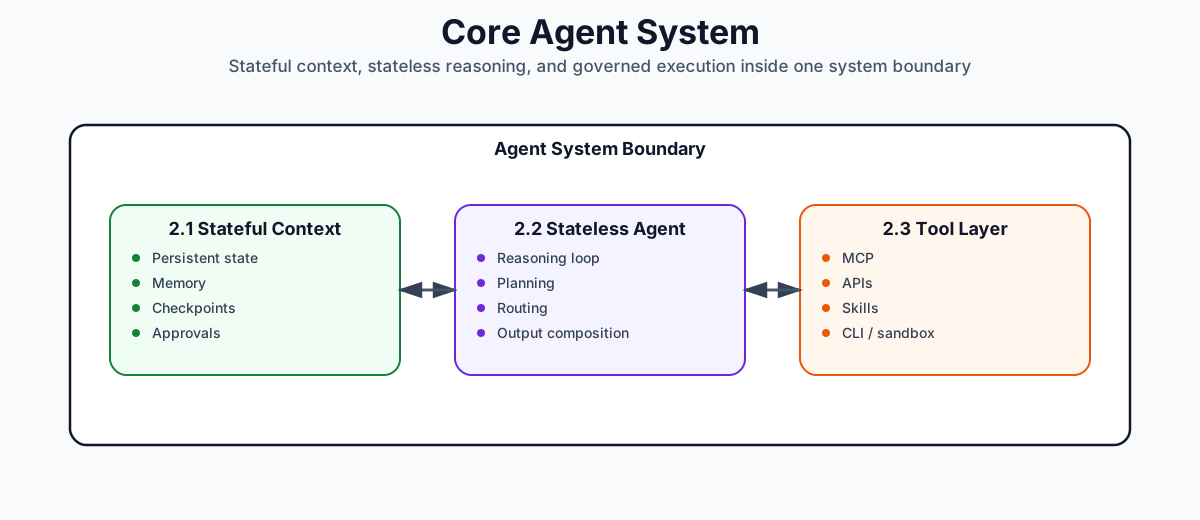
This is the architecture you want when building production services.
2.1 Context Layer
The context layer owns everything that must survive process failure.
It includes:
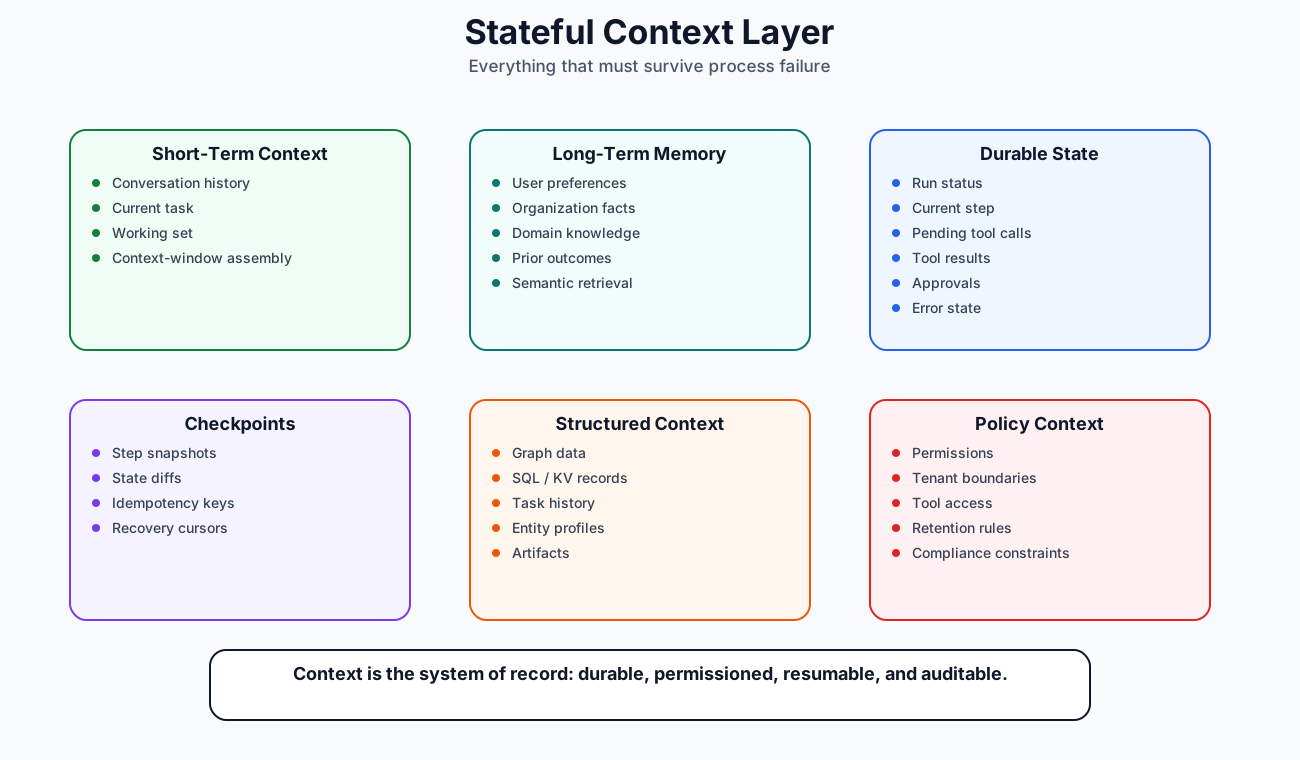
The context layer is where “state” lives.
2.2 Stateless Agent Layer
The agent layer is the reasoning and orchestration runtime.
It should be stateless.
It receives a context snapshot, decides the next action, emits a structured action, and exits or loops. It should not be the source of truth for memory, workflow state, approvals, or progress.
Agent Layer
├── Planner / router
├── Policy interpreter
├── Prompt / instruction assembler
├── Model caller
├── Tool-call decider
├── Reflection / critique step
├── Multi-agent coordinator, if needed
└── Output composer
The agent layer should be restartable at any point.
2.3 Tool Layer
The tool layer is the execution boundary.
It translates agent intentions into controlled external actions.
Tool Layer
├── MCP tools
├── Custom API tools
├── Skills
├── CLI tools
├── Sandbox / executors
├── Tool registry
├── Tool auth
├── Tool policy
├── Tool validation
├── Tool result normalization
└── Tool audit log
The tool layer should connect directly to the agent layer. Context should not sit between the agent and tools as an execution bottleneck. Instead, context records tool requests, tool results, approvals, and state transitions.
The runtime flow looks like this:
1. User submits task.
2. Gateway authenticates request.
3. Context layer creates a durable run.
4. Agent layer loads context snapshot.
5. Agent decides next action.
6. If action is a tool call, tool layer executes it.
7. Context layer records result and checkpoint.
8. Agent continues or exits.
9. If interrupted, another worker resumes from checkpoint.
That is the basic loop of a production agent.
3. The Agent App Layer: Interfaces, Sessions, and Control
Before the agent thinks, the product must decide how users interact with it.
The interface should not be confused with the agent.
A single agent backend can serve many product surfaces:
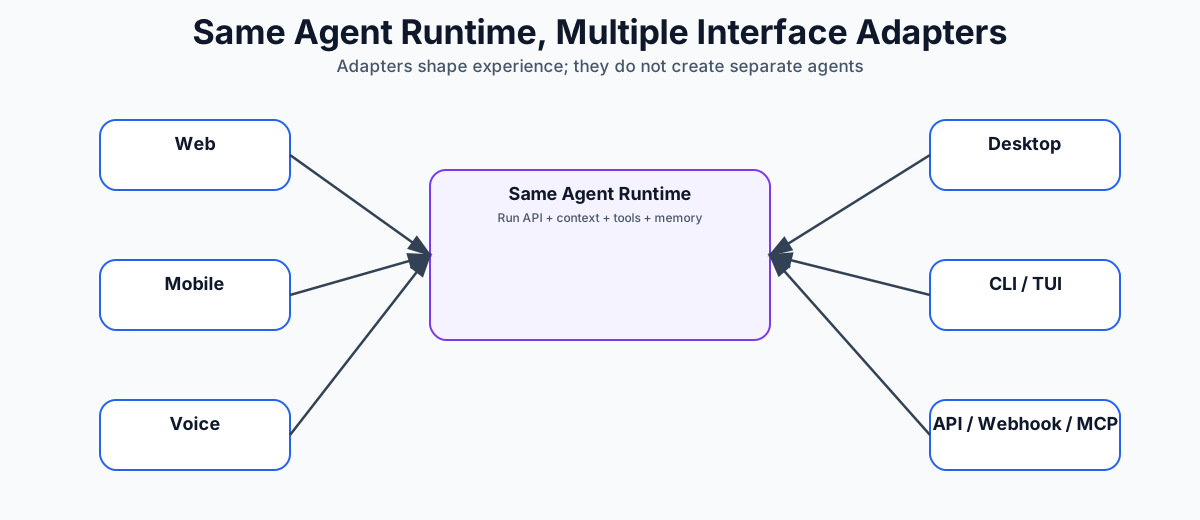
Each adapter talks to the same run API, context store, tool layer, approval system, event stream, and memory service. The adapter’s job is to shape the user experience: what the user can submit, what the agent is allowed to return, how progress is displayed, how approvals work, and how artifacts are rendered.
3.1 Interface Adapter
The interface adapter should translate between channel behavior and agent behavior.
It should handle:
- Input capture
- Output rendering
- Response length policy
- Supported modalities
- Progress display
- Approval controls
- Artifact presentation
- Notification behavior
- Error and retry presentation
- Accessibility constraints
This keeps the agent runtime reusable. The same underlying run can appear as a rich web conversation, a short voice exchange, a terminal workflow, or a structured API job.
3.2 Response Profile
The same agent should not answer every interface the same way.
Give each product surface a response profile.
{
  "channel": "voice",
  "max_response_length": "short",
  "preferred_style": "direct",
  "allowed_modalities": ["speech"],
  "artifact_policy": "summarize_and_offer_link",
  "progress_policy": "brief_status_only",
  "approval_policy": "ask_one_clear_question"
}
Useful response-profile dimensions include:
- Length: terse, short, normal, detailed.
- Modality: text, voice, image, table, chart, file, video, structured JSON.
- Structure: prose, bullets, table, timeline, diff, command output, schema.
- Interaction rhythm: synchronous chat, async job, streaming progress, notification.
- Memory load: what the user can reasonably retain in this channel.
- Artifact handling: inline preview, attachment, link, file path, downloadable object.
- Approval style: button, voice confirmation, CLI prompt, API state transition.
- Fallback behavior: what to do when a modality is unsupported.
A response profile is product logic, not just prompt wording. It should be stored and passed into context assembly so the model, tool layer, and output composer know the channel constraints.
3.3 Web Chat and Rich Web UI
Web is good for dense, inspectable agent output.
A web UI can naturally present:
- Long-form answers
- Tables
- Images
- Charts
- Citations
- Tool-call timelines
- Approval buttons
- File previews
- Generated artifacts
- Memory controls
- Collaboration comments
Because the user can scroll, skim, inspect, and come back later, web responses can be longer and more structured. The agent can show reasoning summaries, source references, tool results, side-by-side diffs, or artifact previews.
But the browser should not own agent state. It should display backend state. If the tab closes, the run should continue, pause, or wait according to durable run policy.
3.4 Mobile UI
Mobile is not just a smaller web page.
Mobile users are interrupted often. They background the app, lose connectivity, switch networks, or respond hours later. The mobile adapter should prefer compact summaries, clear status cards, push notifications, and simple approval flows.
Mobile responses should usually be shorter than web responses. Large artifacts should be summarized first, then opened in a dedicated view. Long-running work should survive app closure because the durable context layer, not the client, owns the run.
3.5 Voice UI
Voice has the tightest attention budget.
A voice agent should usually avoid:
- Long paragraphs
- Deeply nested lists
- Large numbers of options
- Raw IDs
- Tables
- Image-dependent answers
- Dense citations
Voice responses should be short, direct, and easy to remember.
Instead of saying:
I found seven possible renewal risks. First, account usage declined by 23 percent...
say:
I found three major renewal risks: lower usage, an open support issue, and no executive sponsor. Should I send the details to your inbox?
For voice, the agent should often summarize first and offer to send or display details elsewhere. The product can hand off from voice to web, email, mobile notification, or document artifact when the answer is too large to hear comfortably.
3.6 Desktop App
An agent tuned for a desktop app can interact with local files, OS state, IDEs, browsers, and native applications. This makes the desktop adapter powerful but risky.
A desktop adapter should have:
- Explicit local permission model
- File access scoping
- Command execution sandbox
- Audit logs
- Per-tool approval settings
- Workspace boundary
An agent exposed through a desktop app needs stronger guardrails than the same agent exposed through a pure web chat UI, especially when it can read files or run commands.
The desktop adapter should make local scope visible: current workspace, allowed folders, pending file writes, commands, and approvals.
3.7 TUI and CLI
Agents tuned for terminal interfaces are attractive for developers and operators.
The CLI and TUI should optimize for precise, inspectable text:
- File paths
- Diffs
- Commands
- Exit codes
- Logs
- Progress events
- Structured status
- Machine-readable output mode
A CLI adapter should support structured state:
agent run "migrate this service from Redis v6 to v7"
agent status run_123
agent resume run_123
agent approve tool_call_456
agent logs run_123
agent cancel run_123
A CLI response should usually be concise by default and verbose on request. It should not hide important file changes or command results behind conversational prose.
The CLI should not depend on the terminal process staying alive. It should be a client to a durable backend, or it should persist local state robustly.
3.8 API, Webhook, and MCP Interfaces
API, webhook, and MCP surfaces serve other software, not a human reader.
The response contract should be structured:
- Idempotency keys
- Webhook callbacks
- Run status endpoint
- Structured inputs and outputs
- Versioned schemas
- Auth scopes
- Tenant isolation
- Rate limits
- Auditability
The API or MCP-facing adapter should expose the same durable run lifecycle:
POST /runs
GET /runs/{run_id}
POST /runs/{run_id}/cancel
POST /runs/{run_id}/resume
POST /runs/{run_id}/approve
GET /runs/{run_id}/events
For long-running agent work, a synchronous request/response API is usually insufficient. Treat agent runs like jobs with durable state. The API should return status, events, artifacts, required approvals, and final outputs in versioned schemas.
MCP, the Model Context Protocol, is a standard way for AI applications to expose tools and context to each other. (Model Context Protocol)
In this product-surface context, MCP is usually about wrapping your agent as an MCP server or tool so other AI tooling can invoke it: Codex, Claude Code, IDE assistants, internal agent platforms, or other MCP clients.
That is similar to exposing the agent as an API, but more native to AI products.
- API: general-purpose software integration.
- Webhook: event-driven software integration.
- MCP: AI-native tool integration.
MCP can be easier to adopt inside AI-native workflows because the consuming product already understands tools, schemas, resources, and model-mediated invocation. A generic API may require custom client code, documentation, and integration glue. MCP gives other AI systems a standard way to discover and call the agent.
A good production design still treats MCP as a protocol boundary, not as a replacement for authorization, state management, evaluation, or observability.
4. The Context Layer: The System of Record for Agents
The context layer is the most important part of production agent architecture.
In simple chatbots, context often means “the messages passed into the prompt.” That is too narrow for agents.
For production agents, context means:
Everything the agent needs to know, remember, resume, verify, and safely act.
That includes both memory and state.
4.1 State vs Memory
State and memory are related but different.
State is operational.
- What run is active?
- What step are we on?
- What tool call is pending?
- Has the user approved this action?
- Did the last API call fail?
- What retry attempt is this?
- What artifact is being generated?
Memory is knowledge.
- The user prefers concise reports.
- This customer is in the healthcare segment.
- This codebase uses FastAPI.
- This team deploys on Fridays.
- This account renewal is high risk.
A durable agent needs both.
If you store memory but not state, the agent cannot recover from interruption.
If you store state but not memory, the agent can resume but cannot improve over time.
4.2 The Context Layer as a Durable State Machine
A production run should be represented as a state machine.
Example states:
created
queued
planning
waiting_for_model
waiting_for_tool
waiting_for_human
running_tool
checkpointing
failed
cancelled
completed
A minimal run table might look like this:
CREATE TABLE agent_runs (
  run_id              TEXT PRIMARY KEY,
  tenant_id           TEXT NOT NULL,
  user_id             TEXT NOT NULL,
  status              TEXT NOT NULL,
  goal                TEXT NOT NULL,
  current_step        INTEGER NOT NULL DEFAULT 0,
  latest_checkpoint_id TEXT,
  created_at          TIMESTAMP NOT NULL,
  updated_at          TIMESTAMP NOT NULL,
  cancelled_at        TIMESTAMP,
  completed_at        TIMESTAMP
);
A checkpoint table:
CREATE TABLE agent_checkpoints (
  checkpoint_id       TEXT PRIMARY KEY,
  run_id              TEXT NOT NULL,
  step_number         INTEGER NOT NULL,
  state_json          JSONB NOT NULL,
  pending_action_json JSONB,
  model_call_json     JSONB,
  tool_call_json      JSONB,
  tool_result_json    JSONB,
  state_hash          TEXT NOT NULL,
  created_at          TIMESTAMP NOT NULL,

  UNIQUE(run_id, step_number)
);
A tool invocation table:
CREATE TABLE tool_invocations (
  tool_call_id        TEXT PRIMARY KEY,
  run_id              TEXT NOT NULL,
  checkpoint_id       TEXT NOT NULL,
  tool_name           TEXT NOT NULL,
  arguments_json      JSONB NOT NULL,
  status              TEXT NOT NULL,
  idempotency_key     TEXT NOT NULL,
  approval_status     TEXT,
  started_at          TIMESTAMP,
  completed_at        TIMESTAMP,
  error_json          JSONB,
  result_json         JSONB,

  UNIQUE(tool_name, idempotency_key)
);
This structure lets you answer:
What happened?
Where did the agent stop?
Can it resume?
Did this tool already execute?
Can we replay or audit the run?
That is the minimum standard for serious agent systems.
4.3 Checkpoint and Resume
Checkpointing means saving enough state to continue from a known safe point.
A good checkpoint contains:
- Run ID
- Step number
- User goal
- Current plan
- Context snapshot summary
- Pending tool call, if any
- Completed tool results
- Model output
- Decision record
- Retry counters
- Human approval state
- Artifact references
- Memory writes pending
- Idempotency keys
A weak checkpoint says:
Step 4 completed.
A strong checkpoint says:
{
  "run_id": "run_123",
  "step": 4,
  "status": "waiting_for_tool",
  "agent_decision": {
    "type": "tool_call",
    "tool": "crm.get_account",
    "args": {
      "account_id": "acct_789"
    }
  },
  "idempotency_key": "run_123_step_4_crm_get_account_acct_789",
  "approval": {
    "required": false,
    "status": "not_required"
  },
  "context_refs": [
    "conversation:msg_1",
    "memory:user_pref_22",
    "artifact:uploaded_contract_9"
  ],
  "resume_policy": {
    "safe_to_retry": true,
    "max_attempts": 3
  }
}
If the worker dies after this checkpoint, another worker can resume without guessing.
Some frameworks expose durable execution and persistence concepts directly. For example, LangGraph documentation describes durable execution as saving workflow state to a durable store so completed work can be resumed without reprocessing, and its persistence docs describe saving graph state as checkpoints organized into threads. (LangChain Docs)
But the concept is bigger than any framework. Durable execution is a system property. Your agent must know which operations are safe to replay, which are not, and which require compensation.
4.4 Resume Is Not Just Retry
Retry means:
Do the same thing again.
Resume means:
Continue from the last correct durable state.
For pure model calls, retry may be acceptable.
For external actions, retry can be dangerous.
Suppose the agent sends an email, creates an invoice, submits an order, or deletes a file. If the process crashes after the tool executes but before the result is saved, blindly retrying may duplicate the action.
Therefore, tool execution must use idempotency keys.
{
  "tool": "email.send",
  "args": {
    "to": "customer@example.com",
    "subject": "Renewal proposal"
  },
  "idempotency_key": "run_123_step_8_email_customer_renewal"
}
The tool layer should guarantee:
Same idempotency key + same arguments = same result or no duplicate side effect.
If a tool cannot support idempotency, it should require human approval or be wrapped with a compensation strategy.
4.5 Event Sourcing for Agents
Many production systems benefit from event-sourced agent state.
Instead of only saving the latest state, append events:
RunCreated
UserMessageReceived
ContextHydrated
ModelCalled
ModelResponded
ToolCallProposed
ToolCallApproved
ToolCallStarted
ToolCallSucceeded
ToolCallFailed
CheckpointWritten
MemoryWriteProposed
MemoryWriteCommitted
RunCompleted
This gives you:
- Auditability
- Replay
- Debugging
- Evaluation traces
- Time-travel inspection
- Safer recovery
The current run state can be materialized from events.
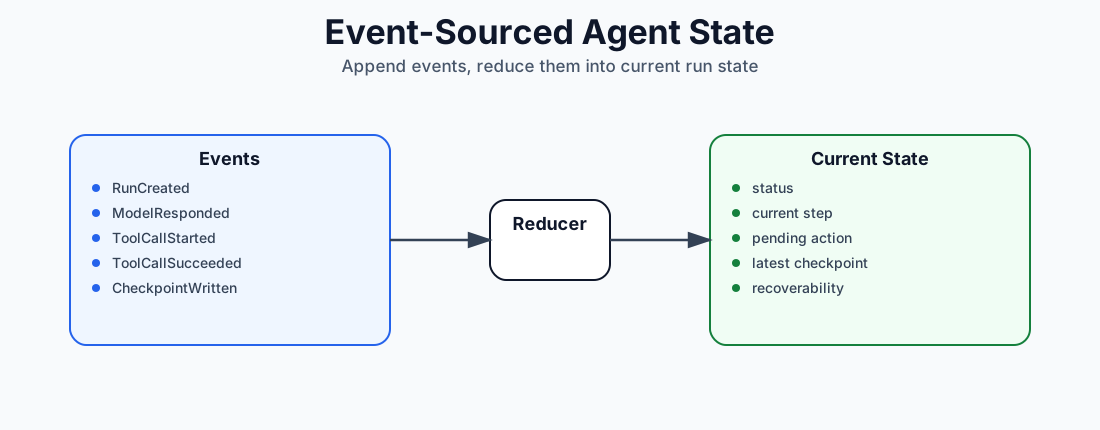
This is especially powerful when agents are nondeterministic. You may not be able to reproduce the exact model output later, but you can preserve what happened.
4.6 Context Assembly
The context layer does not simply dump everything into the model prompt.
It should assemble a context pack.
Context Pack
├── System instructions
├── Developer instructions
├── User task
├── Relevant conversation history
├── Current run state
├── Retrieved memory
├── Retrieved documents
├── Tool schemas
├── Policy constraints
├── Output contract
└── Budget constraints
A context pack should be scoped, ranked, and budgeted.
Not all context is equal. The agent needs the right context, not the most context.
A context assembly pipeline might look like this:
1. Load run state.
2. Load latest user message.
3. Retrieve relevant memories.
4. Retrieve relevant documents.
5. Filter by permission and tenant.
6. Rank by relevance, recency, confidence, and importance.
7. Compress or summarize lower-priority context.
8. Add tool schemas needed for this step.
9. Add output format contract.
10. Send to model.
The context layer should know the model’s context budget. A large frontier model, a small model, and a specialized model may receive different context packs.
4.7 Memory Intelligence
Memory is not a vector database. A vector database is one storage and retrieval mechanism.
Memory intelligence includes:
- What should be remembered?
- What should be forgotten?
- What should be updated?
- What should be retrieved?
- What should be trusted?
- What should be shown to the user?
- What should be scoped to user, team, tenant, or task?
A memory system should support different memory types.
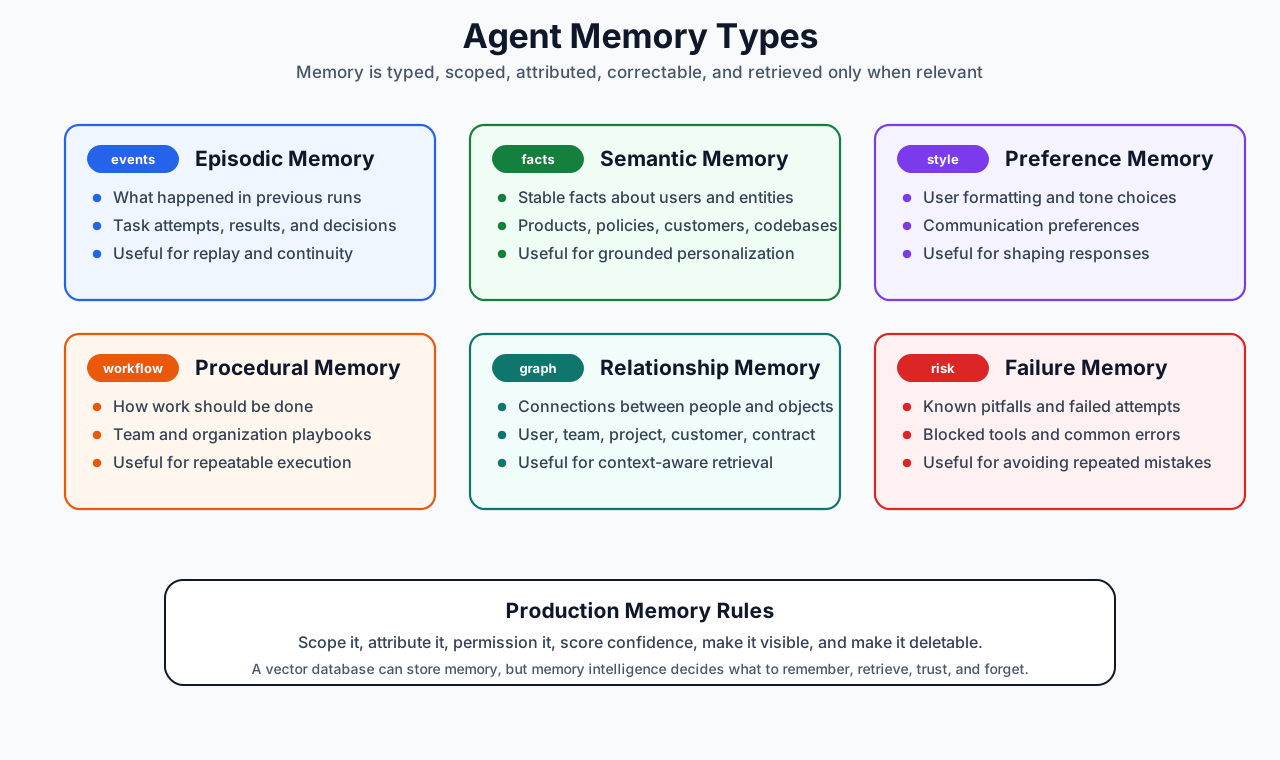
A memory record should include metadata.
{
  "memory_id": "mem_123",
  "tenant_id": "tenant_1",
  "scope": "user",
  "subject": "user:alice",
  "type": "preference",
  "content": "Alice prefers executive summaries before detailed analysis.",
  "source": {
    "run_id": "run_456",
    "message_id": "msg_789"
  },
  "confidence": 0.88,
  "created_at": "2026-01-10T10:15:00Z",
  "updated_at": "2026-01-10T10:15:00Z",
  "expires_at": null,
  "visibility": "user_visible",
  "acl": ["user:alice"]
}
Good memory is:
- Scoped
- Attributed
- Correctable
- Permissioned
- Time-aware
- Confidence-scored
- Retrievable
- Deletable
Bad memory is:
- Global
- Unattributed
- Uneditable
- Always injected
- Mixed across tenants
- Stored without consent
4.8 Memory Write Pipeline
Memory writes should often be asynchronous.
During a run, the agent may propose memory writes:
{
  "type": "memory_write_proposal",
  "memory_type": "preference",
  "content": "User prefers diagrams before prose explanations.",
  "confidence": 0.76,
  "requires_user_confirmation": false
}
A background memory service can then:
1. Validate the proposed memory.
2. Check for duplicates.
3. Merge with existing memory.
4. Apply policy.
5. Set scope and expiration.
6. Store it.
7. Make it visible for inspection.
Some memory writes should require user approval, especially if they affect future behavior.
4.9 Context Security
Context is sensitive.
It may contain user messages, private documents, tool results, credentials, customer data, business data, and inferred preferences.
Context security requires:
- Tenant isolation
- Row-level permissions
- Encryption at rest
- Encryption in transit
- Secrets separation
- PII redaction
- Data retention policies
- Memory deletion
- Audit logs
- Access reviews
A retrieval system must enforce authorization before retrieval, not after.
The wrong design:
Retrieve top 20 memories globally -> filter unauthorized records
The right design:
Apply tenant/user ACL filter -> retrieve top relevant records within allowed scope
Never let the model see data the user is not authorized to access.
5. The Stateless Agent Layer
The agent layer is the reasoning layer.
Its job is to decide:
Given this goal, context, policy, and available tools, what should happen next?
It should not own durable state. It should consume state and produce actions.
5.1 Agent Loop
A basic loop:
def run_agent_step(run_id: str):
    context = context_store.load_context_pack(run_id)

    decision = agent_runtime.decide_next_action(context)

    context_store.record_agent_decision(run_id, decision)

    if decision.type == "respond_to_user":
        context_store.complete_step(run_id, decision.message)
        return

    if decision.type == "tool_call":
        context_store.mark_waiting_for_tool(run_id, decision.tool_call)
        tool_result = tool_layer.execute(decision.tool_call)
        context_store.record_tool_result(run_id, tool_result)
        context_store.write_checkpoint(run_id)
        return

    if decision.type == "ask_human":
        context_store.mark_waiting_for_human(run_id, decision.question)
        context_store.write_checkpoint(run_id)
        return
In production, this loop runs inside a worker that can stop at any point. The context store makes the next step recoverable.
5.2 Stateless by Design
The agent worker should not rely on local variables surviving.
This is fragile:
agent_memory = []
current_plan = {}
pending_tool_call = None

while not done:
    ...
This is better:
while not done:
    context = load_latest_checkpoint(run_id)
    decision = decide(context)
    persist_decision(run_id, decision)
    execute_or_wait(decision)
The agent should be replaceable.
You should be able to upgrade:
Agent runtime v1 -> Agent runtime v2
Model A -> Model B
Prompt v17 -> Prompt v18
Tool schema v3 -> Tool schema v4
without losing run state.
5.3 Planning
Planning can be explicit or implicit.
Explicit planning:
1. Understand the task.
2. Break it into steps.
3. Identify required tools.
4. Ask for missing information.
5. Execute steps.
6. Verify result.
7. Produce final answer.
Implicit planning lets the model decide step by step without a separate plan object.
For production, explicit plans are often better because they can be inspected, approved, resumed, and evaluated.
A plan object might look like this:
{
  "plan_id": "plan_123",
  "run_id": "run_456",
  "steps": [
    {
      "step": 1,
      "description": "Retrieve customer account details",
      "status": "completed",
      "tool": "crm.get_account"
    },
    {
      "step": 2,
      "description": "Analyze renewal risk",
      "status": "in_progress"
    },
    {
      "step": 3,
      "description": "Draft action plan",
      "status": "pending"
    }
  ]
}
A plan should be editable. Users and humans-in-the-loop should be able to modify the plan before execution.
5.4 Reflection
Reflection means the agent reviews whether the previous step was good enough.
But production reflection should be bounded.
Bad reflection:
Think until you are confident.
Good reflection:
Check whether the output satisfies these acceptance criteria:
- includes customer risks
- includes next actions
- cites retrieved CRM data
- avoids unsupported claims
- fits within 500 words
Reflection should produce structured outcomes:
{
  "passed": false,
  "issues": [
    "Missing renewal date",
    "No source for expansion opportunity"
  ],
  "next_action": "retrieve_more_context"
}
Do not let reflection become an infinite loop. Set limits:
- Max model calls per run
- Max tool calls per run
- Max reflection attempts
- Max cost
- Max wall-clock duration
5.5 Single-Agent vs Multi-Agent
A single-agent system has one reasoning loop.
A multi-agent system has multiple specialized roles:
Planner agent
Research agent
Coding agent
Reviewer agent
Executor agent
Supervisor agent
Multi-agent systems can improve decomposition, review, and specialization, but they are harder to debug.
Use multi-agent architecture when:
- Tasks require distinct expert roles
- Parallel work matters
- Review or adversarial checking is valuable
- Different models/tools are needed for different subtasks
Avoid multi-agent architecture when:
- A deterministic workflow is enough
- The task is short
- Latency matters more than collaboration
- You cannot observe and evaluate each role
Many products should start with a single agent plus deterministic workflow steps.
6. The Tool Layer: MCP, Custom APIs, Skills, CLI, and Sandbox
The tool layer is where the agent touches the world.
It is also where the most damage can happen.
A model response can be wrong; a tool call can send money, delete data, email customers, modify production, or leak secrets.
Therefore, tool execution must be controlled.
6.1 Tool Layer Responsibilities
The tool layer should handle:
- Tool discovery
- Tool schemas
- Argument validation
- Authorization
- User approval
- Rate limits
- Idempotency
- Execution
- Sandboxing
- Timeout control
- Retries
- Result normalization
- Error handling
- Audit logs
- Policy enforcement
The agent should not call arbitrary functions directly.
It should emit a structured tool request:
{
  "tool": "crm.get_account",
  "arguments": {
    "account_id": "acct_123"
  },
  "reason": "Need account status before drafting renewal plan",
  "risk_level": "read_only",
  "idempotency_key": "run_456_step_2_crm_get_account_acct_123"
}
The tool layer validates and executes it.
6.2 MCP
MCP tools are one abstraction for connecting agents to external systems. MCP uses JSON-RPC-style protocol messages and defines components such as lifecycle management, authorization for certain transports, server features like resources/prompts/tools, and utilities such as logging and cancellation. (Model Context Protocol)
In your architecture, MCP should sit inside the tool layer as one connector standard.
Tool Layer
├── MCP connector
│   ├── list tools
│   ├── call tools
│   ├── read resources
│   └── access prompts
Use MCP when you want standardized tool and context integration across clients and servers.
Do not use MCP as an excuse to skip:
- Auth
- Approval
- Sandboxing
- Observability
- Memory policy
- Tenant isolation
- Rate limiting
- Evaluation
The MCP specification explicitly calls out trust and safety concerns around tool access and recommends clear UI indicators and user control for operations. (Model Context Protocol)
6.3 Custom Tools APIs
Custom tools are your internal or external APIs.
Examples:
crm.get_account
crm.update_opportunity
email.draft
email.send
calendar.find_slots
calendar.book_meeting
jira.create_ticket
github.open_pr
billing.create_invoice
warehouse.run_query
Each custom tool should have:
- Name
- Description
- JSON schema
- Auth requirements
- Permission scope
- Risk level
- Timeout
- Retry policy
- Idempotency behavior
- Approval policy
- Result schema
Example:
{
  "name": "calendar.book_meeting",
  "description": "Book a meeting on behalf of a user.",
  "risk_level": "external_side_effect",
  "approval_required": true,
  "input_schema": {
    "type": "object",
    "required": ["attendees", "start_time", "end_time", "title"],
    "properties": {
      "attendees": {
        "type": "array",
        "items": { "type": "string" }
      },
      "start_time": { "type": "string", "format": "date-time" },
      "end_time": { "type": "string", "format": "date-time" },
      "title": { "type": "string" }
    }
  }
}
6.4 Skills
Skills are becoming a standard packaging format for agent capabilities across AI tools such as Claude Code, Codex, Cursor-style coding assistants, and other skills-compatible clients.
In the Agent Skills format, a skill is a folder containing a SKILL.md file plus optional supporting files. The Anthropic skills repository describes skills as folders of instructions, scripts, and resources that Claude loads dynamically, and the Agent Skills specification defines the common SKILL.md structure. (Anthropic Skills, Agent Skills)
my-skill/
├── SKILL.md          # Required: metadata + instructions
├── scripts/          # Optional: executable code
├── references/       # Optional: documentation
├── assets/           # Optional: templates, examples, resources
└── ...
The minimal SKILL.md schema is intentionally small:
---
name: renewal-plan
description: Create renewal plans for customer accounts. Use when analyzing renewal risk, account history, support issues, and next actions for customer success teams.
---

# Renewal Plan

Follow this workflow:
1. Identify account, owner, renewal date, and contract status.
2. Gather usage, support, product adoption, and relationship signals.
3. Separate facts from inferences.
4. Produce an executive summary, risk table, and recommended actions.
5. Cite the source for every material claim.
The required fields are:
- name: unique lowercase identifier.
- description: what the skill does and when the agent should use it.
Optional fields and folders can add compatibility metadata, license information, allowed tools, scripts, references, templates, schemas, examples, and assets.
The key design pattern is progressive disclosure.
1. Discovery: load only skill names and descriptions.
2. Activation: when the task matches, load the full SKILL.md.
3. Execution: load referenced files or run bundled scripts only when needed.
That gives an agent access to many capabilities without stuffing all instructions into every prompt.
Skills fill a different gap than MCP or custom tools.
MCP gives the agent a standard way to call external tools and read external context.
Custom tools give the agent product-specific APIs.
Skills teach the agent how to perform a task well using instructions, examples, references, scripts, and templates.
MCP can expose crm.get_account. A custom API can return the account record. But neither one tells the agent how your customer success team defines renewal risk, which signals matter, how to format the executive summary, when to escalate, what claims need citations, or how to produce a customer-ready plan.
A skill can encode that procedure:
renewal-plan/
├── SKILL.md
├── references/
│   ├── renewal-risk-rubric.md
│   ├── customer-success-playbook.md
│   └── escalation-policy.md
├── assets/
│   └── renewal-plan-template.md
└── scripts/
    └── normalize-crm-export.py
This is why skills matter in production agent products.
They provide:
- Portable procedural knowledge across skills-compatible tools.
- Version-controlled team and company workflows.
- Reusable task recipes that are easier to inspect than hidden prompt logic.
- On-demand context loading instead of permanent prompt bloat.
- Bundled scripts and templates close to the instructions that use them.
- A bridge between general-purpose reasoning and organization-specific execution.
Skills should not replace tools. A skill may instruct the agent to use MCP tools, custom APIs, CLI commands, or sandbox scripts. The skill is the know-how layer; the tool layer is the action layer.
In a production architecture, treat skills as governed deployable assets:
- Store them in version control.
- Review them like code.
- Test them with evals.
- Track which skill version was active for each run.
- Scope them by user, team, tenant, workspace, or product surface.
- Make activation observable so you know when a skill changed behavior.
6.5 CLI Tools
CLI tools are useful for developer agents, data agents, and operational agents.
Examples:
git
gh
kubectl
terraform
python
node
pytest
psql
ripgrep
curl
CLI execution should almost always happen inside a sandbox.
The tool result should capture:
{
  "command": "pytest tests/test_api.py",
  "exit_code": 1,
  "stdout": "...",
  "stderr": "...",
  "duration_ms": 8421,
  "files_changed": [],
  "sandbox_id": "sandbox_123"
}
Never give an agent unrestricted shell access on a production host.
6.6 Sandbox / Executors
The sandbox is not just another tool. It is the controlled execution environment for risky tools.
It may run:
- CLI commands
- Code interpreter jobs
- Skills that execute code
- Browser automation
- File transformations
- Data analysis scripts
A sandbox should provide:
- Filesystem isolation
- Network egress control
- CPU/memory limits
- Timeouts
- Secret isolation
- Artifact capture
- Command audit logs
- Malware scanning, if needed
- Cleanup
The sandbox should be policy-aware.
Example policies:
- This user can run Python but not shell.
- This agent can read files but not write.
- This task can access the internet but only allowlisted domains.
- This sandbox can run for 10 minutes maximum.
- This command requires approval because it changes production.
6.7 Tool Result Normalization
Tools return messy outputs.
The tool layer should normalize them.
Raw result:
HTTP 500: upstream timeout
Normalized result:
{
  "status": "failed",
  "error_type": "upstream_timeout",
  "retryable": true,
  "message": "CRM API timed out after 30 seconds.",
  "suggested_next_action": "retry_with_backoff"
}
The agent can reason better with structured tool results.
6.8 Tool Safety Levels
Classify tools by risk.
Level 0: Pure read
  Search, retrieve, summarize.

Level 1: Local write
  Draft file, create local artifact.

Level 2: External draft
  Draft email, prepare PR, create unsent invoice.

Level 3: External side effect
  Send email, book calendar, update CRM.

Level 4: High-risk side effect
  Deploy, delete, charge card, change access, modify production.
Each level should have different approval and logging requirements.
7. AI Infrastructure: Model Router, Providers, Self-Hosted Models, and Specialized Models
The agent layer needs models, but not every task should go to the same model.
A production system should have a model gateway or model router.
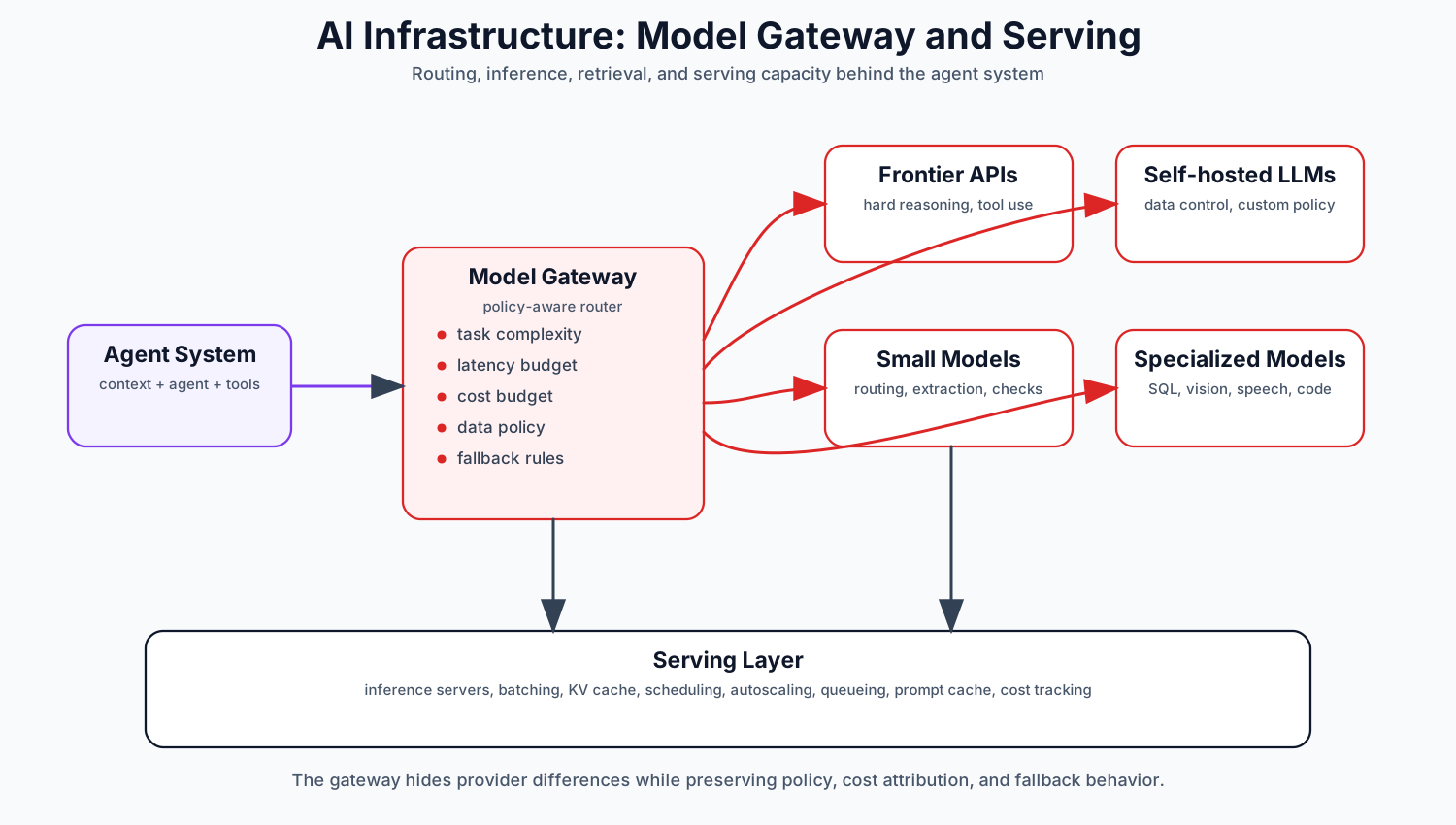
7.1 Model Router
The model router decides which model to call.
Routing dimensions:
- Task complexity
- Required reasoning depth
- Latency budget
- Cost budget
- Context length
- Tool-use capability
- Modality: text, image, audio, video
- Data sensitivity
- Tenant policy
- Availability
- Region / data residency
- Evaluation history
Example routing policy:
If task is low-risk classification:
  use small model.

If task requires deep reasoning:
  use frontier provider.

If task involves sensitive internal data:
  use self-hosted model.

If task is retrieval ranking:
  use reranker.

If task is SQL generation:
  use specialized SQL model or constrained generation.

If provider is down:
  fallback to approved alternative model.
A router request might look like this:
{
  "run_id": "run_123",
  "step": 5,
  "task_type": "planning",
  "complexity": "high",
  "latency_budget_ms": 8000,
  "max_cost_usd": 0.15,
  "data_classification": "confidential",
  "requires_tool_calling": true,
  "context_tokens_estimate": 24000
}
The router response:
{
  "selected_model": "frontier_reasoning_model",
  "fallback_models": ["self_hosted_domain_llm", "small_planner_model"],
  "reason": "High-complexity planning with tool use required.",
  "max_output_tokens": 2000
}
7.2 Frontier Provider APIs
Frontier models are often best for:
- Hard reasoning
- Complex tool use
- Ambiguous tasks
- Multi-step planning
- High-quality writing
- Multimodal understanding
Their drawbacks:
- Cost
- Latency
- Data governance constraints
- Vendor dependency
- API behavior changes
- Rate limits
The model gateway should normalize provider differences.
It should abstract:
- Message format
- Tool-call format
- Streaming format
- Token counting
- Error handling
- Retries
- Safety metadata
- Cost calculation
The agent layer should not be tightly coupled to one provider’s API shape.
7.3 Self-Hosted Post-Trained LLMs
Self-hosted models are useful when you need:
- Data control
- Lower marginal cost at scale
- Domain adaptation
- Predictable availability
- Custom safety behavior
- On-prem or private cloud deployment
Post-training may include:
- Instruction tuning
- Supervised fine-tuning
- Preference tuning
- Domain adaptation
- Tool-use tuning
- Style tuning
Self-hosting also adds operational burden:
- GPU capacity
- Model serving
- Autoscaling
- Quantization decisions
- Monitoring
- Model registry
- Rollbacks
- Security patches
Self-hosted does not automatically mean cheaper. It becomes attractive when utilization, data requirements, or customization justify the operational complexity.
7.4 Small Language Models
Small language models are useful for:
- Classification
- Routing
- Extraction
- Summarization
- Rewrite tasks
- Guardrail checks
- Local/edge inference
- High-QPS low-cost workloads
A common pattern is:
Small model handles cheap decisions.
Large model handles hard reasoning.
Specialized model handles narrow expert tasks.
For example:
1. Small model classifies intent.
2. Retriever fetches relevant context.
3. Reranker orders documents.
4. Large model plans.
5. Tool layer executes.
6. Small model checks output format.
This reduces cost without forcing every step through the largest model.
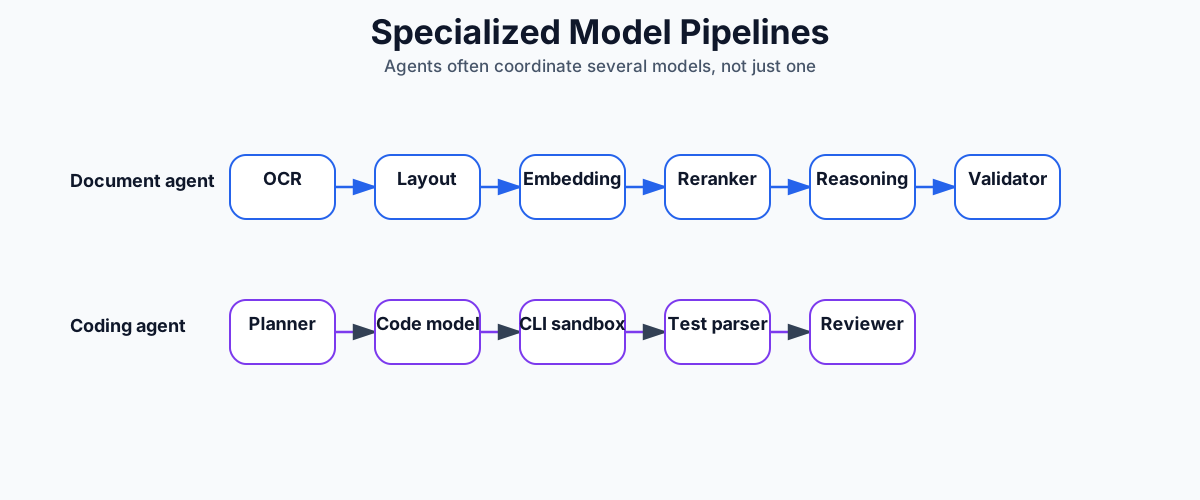
7.5 Specialized Models
Specialized models include:
- Embedding models
- Rerankers
- SQL generation models
- Code models
- Vision models
- Speech-to-text models
- Text-to-speech models
- Moderation models
- Entity extraction models
- Document layout models
Agents are systems of models, not just one model. A document-processing workflow and a coding workflow might use different model pipelines:
7.6 Inference Serving
If you self-host, the inference layer needs:
- Model servers
- GPU scheduling
- Request batching
- KV cache management
- Model registry
- Versioning
- Autoscaling
- Queueing
- Load shedding
- Monitoring
Optimization techniques may include:
- Continuous batching
- Quantization
- Speculative decoding
- Prompt caching
- KV cache reuse/offload
- Request prioritization
- Distillation
- Smaller model cascades
But optimization is not free. It can affect quality, debuggability, latency distribution, and model behavior.
The right production metric is not simply tokens per second. It is:
successful tasks per dollar within latency and quality constraints
8. Traditional Infrastructure Still Matters
Agents are new, but production infrastructure is not.
Most agent failures are familiar distributed-systems failures wearing an AI costume.
8.1 API Gateway and Auth
The gateway should handle:
- Authentication
- Authorization
- Tenant identification
- Rate limiting
- Request validation
- Quotas
- Billing metadata
- Abuse detection
- Routing
Agent systems need especially strong authorization because tool calls may access user data or perform actions.
Every request should carry:
- user_id
- tenant_id
- role
- scopes
- data classification
- request_id
- trace_id
8.2 Databases
A typical production agent product uses multiple stores.
Relational database
  Users, tenants, runs, permissions, tool invocations, checkpoints.

Event log
  Append-only audit trail and replayable run history.

Object storage
  Files, generated artifacts, screenshots, logs, exported reports.

Vector database / vector index
  Semantic retrieval over documents and memory.

Key-value store
  Fast session metadata, locks, leases, rate limits.

Graph database or graph index
  Entity relationships, organizational context, task dependencies.

Search index
  Keyword and hybrid search.
Do not force everything into a vector database.
Vector search is useful for semantic similarity. It is not a substitute for transactional state, audit logs, permissions, or structured queries.
8.3 Queues and Workers
Agent runs are often long-running and bursty.
Use queues.
Queue types
├── model_call_queue
├── tool_execution_queue
├── memory_write_queue
├── evaluation_queue
├── notification_queue
└── artifact_processing_queue
Workers should be stateless and horizontally scalable.
Worker picks job.
Worker loads context.
Worker performs one safe unit of work.
Worker writes checkpoint.
Worker acknowledges job.
This reduces blast radius.
8.4 Idempotency
Idempotency is mandatory.
Every externally visible operation should have an idempotency key:
- Create run
- Execute tool
- Send email
- Submit form
- Create ticket
- Write artifact
- Commit memory
Idempotency lets your system survive retries.
8.5 Leases and Locks
Long-running work needs concurrency control.
Example:
Worker A picks run_123.
Worker A obtains lease for 60 seconds.
Worker A renews lease while working.
Worker A dies.
Lease expires.
Worker B resumes from checkpoint.
Avoid global locks. Use narrow leases around runs or steps.
8.6 Backpressure
Agent systems can explode in cost and load.
A single user request can trigger:
- 10 model calls
- 20 tool calls
- 5 retrieval queries
- 3 memory writes
- 2 evaluations
Your system needs backpressure:
- Per-user run limits
- Per-tenant model budget
- Tool concurrency limits
- Queue depth limits
- Circuit breakers
- Graceful degradation
8.7 Circuit Breakers
If a tool or provider fails repeatedly, stop calling it temporarily.
if crm_api.error_rate > threshold:
    open_circuit("crm_api")
    route agent to degraded behavior:
        - ask user to retry later
        - use cached read-only data
        - skip optional action
Agents should know when tools are unavailable.
8.8 Caches
Useful caches include:
- Prompt cache
- Model response cache for deterministic subtasks
- Embedding cache
- Retrieval cache
- Tool result cache for read-only tools
- User profile cache
- Policy cache
Be careful caching outputs that depend on permissions, time, or private data.
8.9 Deployment
Agent systems should support:
- Prompt versioning
- Tool versioning
- Model versioning
- Skill versioning
- Canary releases
- Rollbacks
- Shadow evaluation
- Tenant-level feature flags
A prompt change is a production change. Treat it like code.
9. Observability: The Agent Debugger
Observability is not optional.
Traditional observability tracks services. Agent observability must track reasoning, context, model calls, tool calls, state transitions, and cost.
OpenTelemetry is a vendor-neutral observability framework for generating, collecting, and exporting telemetry such as traces, metrics, and logs; its docs describe observability as understanding system behavior through outputs like telemetry data. (OpenTelemetry)
An agent trace should show:
Run
├── User request
├── Context retrieval
├── Model call
│   ├── model name
│   ├── prompt version
│   ├── input token count
│   ├── output token count
│   ├── latency
│   └── cost
├── Agent decision
├── Tool call
│   ├── tool name
│   ├── arguments
│   ├── approval status
│   ├── latency
│   ├── result
│   └── error
├── Checkpoint write
├── Memory write
├── Evaluation result
└── Final response
9.1 Agent-Specific Metrics
Track:
Quality metrics
- task success rate
- user correction rate
- human escalation rate
- hallucination rate
- tool-call accuracy
- final answer acceptance

Latency metrics
- time to first token
- time to first useful action
- time to completion
- model latency
- tool latency
- checkpoint latency

Cost metrics
- cost per run
- cost per successful task
- tokens per run
- tool cost
- model mix
- retry cost

Reliability metrics
- run failure rate
- resume success rate
- checkpoint failure rate
- tool timeout rate
- provider fallback rate
- queue delay

Memory metrics
- memory retrieval precision
- memory retrieval recall
- memory write acceptance
- memory correction rate
- stale memory rate
- unauthorized retrieval incidents

Safety metrics
- approval denial rate
- policy violations
- blocked tool calls
- sensitive-data exposure events
- prompt-injection detections
9.2 Logs Are Not Enough
Raw logs tell you what happened. They often do not tell you why the agent made a decision.
But you also should not depend on private hidden reasoning traces.
Instead, store structured decision records:
{
  "decision_type": "tool_call",
  "selected_tool": "crm.get_account",
  "decision_summary": "The account record is needed to verify renewal date and owner before drafting plan.",
  "input_context_refs": [
    "msg_123",
    "memory_456"
  ],
  "policy_checks": [
    "read_only_tool_allowed"
  ]
}
This gives debuggability without relying on raw hidden reasoning.
9.3 Cost Attribution
Every model and tool call should be attributable.
Cost by:
- tenant
- user
- run
- feature
- model
- skill
- tool
- prompt version
Without cost attribution, agent systems become expensive mysteries.
9.4 Trace Replay
The best debugging tool is trace replay.
A replay system should allow:
- Replay same context with same model version.
- Replay same context with new model version.
- Replay same task with new prompt.
- Replay failed tool sequence with mocked tools.
- Compare outputs side by side.
This becomes the foundation for evaluation.
10. Evaluation: How You Know the Agent Is Getting Better
Evaluation is the operating system for agent improvement.
Without evaluation, every change is vibes.
An agent eval system should test:
- Does the agent solve the task?
- Does it use the right tools?
- Does it avoid unsafe actions?
- Does it retrieve correct context?
- Does it respect memory?
- Does it handle interruption?
- Does it resume correctly?
- Does it stay within cost and latency budgets?
10.1 Offline Evals
Offline evals run before deployment.
Types:
Golden task evals
  Fixed tasks with expected outcomes.

Tool-use evals
  Did the agent choose the correct tool and arguments?

Retrieval evals
  Did the context layer retrieve the right documents/memories?

Memory evals
  Did the agent use relevant memory and ignore irrelevant memory?

Safety evals
  Did the agent refuse or request approval for risky operations?

Regression evals
  Did a new prompt/model break old behavior?

Adversarial evals
  Can prompt injection, malformed tool output, or conflicting instructions break behavior?

Resume evals
  Can the run resume after failure at every checkpoint?
A golden eval record:
{
  "eval_id": "eval_renewal_001",
  "task": "Create a renewal risk summary for account A.",
  "initial_context": ["crm_account_fixture", "email_history_fixture"],
  "expected_behaviors": [
    "retrieves CRM account",
    "identifies renewal date",
    "mentions open support escalation",
    "does not send email without approval"
  ],
  "success_criteria": {
    "requires_sources": true,
    "max_cost_usd": 0.20,
    "max_duration_seconds": 60
  }
}
10.2 Online Evals
Online evals measure production behavior.
Examples:
- User thumbs up/down
- Task completion confirmation
- Human reviewer score
- Automatic policy checks
- Tool result validation
- A/B tests
- Canary comparison
- Shadow runs
A shadow run sends the same task to a candidate agent version without showing the result to the user. You compare it to production.
10.3 LLM-as-Judge
LLM-as-judge can help, but it must be calibrated.
Use it for:
- Style matching
- Completeness checks
- Source-grounding checks
- Rubric scoring
- Comparative ranking
Do not blindly trust it for:
- High-stakes correctness
- Legal/medical/financial conclusions
- Security decisions
- Silent production gating
For important workflows, combine automated judging with human review and objective checks.
10.4 Evaluation of Durable Context
Most teams evaluate answers. Fewer evaluate durability.
You should test:
- Worker crashes before model call.
- Worker crashes after model call before checkpoint.
- Worker crashes after tool call before result persisted.
- Tool times out.
- User approval arrives after delay.
- User edits task midway.
- Model provider fails.
- Context retrieval returns stale memory.
- Unauthorized memory exists but must not be retrieved.
A production-grade agent should survive all of these.
11. How Agents Evolve as Models Improve
The most important long-term design question is:
How do you build an agent product that improves as models get better without rewriting everything?
The answer is stable interfaces.
Keep these stable:
- Context schema
- Tool contracts
- Skill contracts
- Evaluation suites
- Observability events
- Run lifecycle
- Memory model
- Approval policies
Then models can improve inside the system.
11.1 What Better Models Change
As LLMs improve, they usually reduce the amount of scaffolding needed for some tasks.
Better models may:
- Need fewer examples
- Plan more reliably
- Use tools better
- Handle longer context
- Recover from ambiguity
- Follow policies more accurately
- Generate better structured outputs
- Need fewer reflection loops
But better models do not remove the need for:
- Durable state
- Tool authorization
- Audit logs
- Evals
- Observability
- Idempotency
- Data permissions
- Human approval
- Cost controls
A stronger model improves the agent layer. It does not replace the product stack.
11.2 Evolution Pattern
A common evolution path:
Phase 1: Workflow with AI steps
  Deterministic product workflow, LLM used for summarization or drafting.

Phase 2: Tool-using assistant
  LLM chooses from a small set of read-only tools.

Phase 3: Durable agent
  Agent has checkpoints, memory, resumability, and controlled side effects.

Phase 4: Skill-based agent platform
  Reusable skills, tool registry, eval suite, observability.

Phase 5: Multi-agent or autonomous workflows
  Specialized agents collaborate with explicit state and governance.

Phase 6: Adaptive agent system
  Model routing, continual evals, memory intelligence, personalized behavior.
The safest approach is not “make the agent autonomous immediately.”
It is:
Start deterministic.
Add agency where it creates value.
Measure everything.
Expand autonomy only where evals prove reliability.
11.3 Data Flywheel
A production agent should improve from usage.
The flywheel:
1. Users submit tasks.
2. Agent runs produce traces.
3. Tool results and user feedback are captured.
4. Failures become eval cases.
5. Successful runs become examples.
6. Memory improves personalization.
7. Skills are refined.
8. Model routing improves.
9. New versions are evaluated and canaried.
10. Production quality improves.
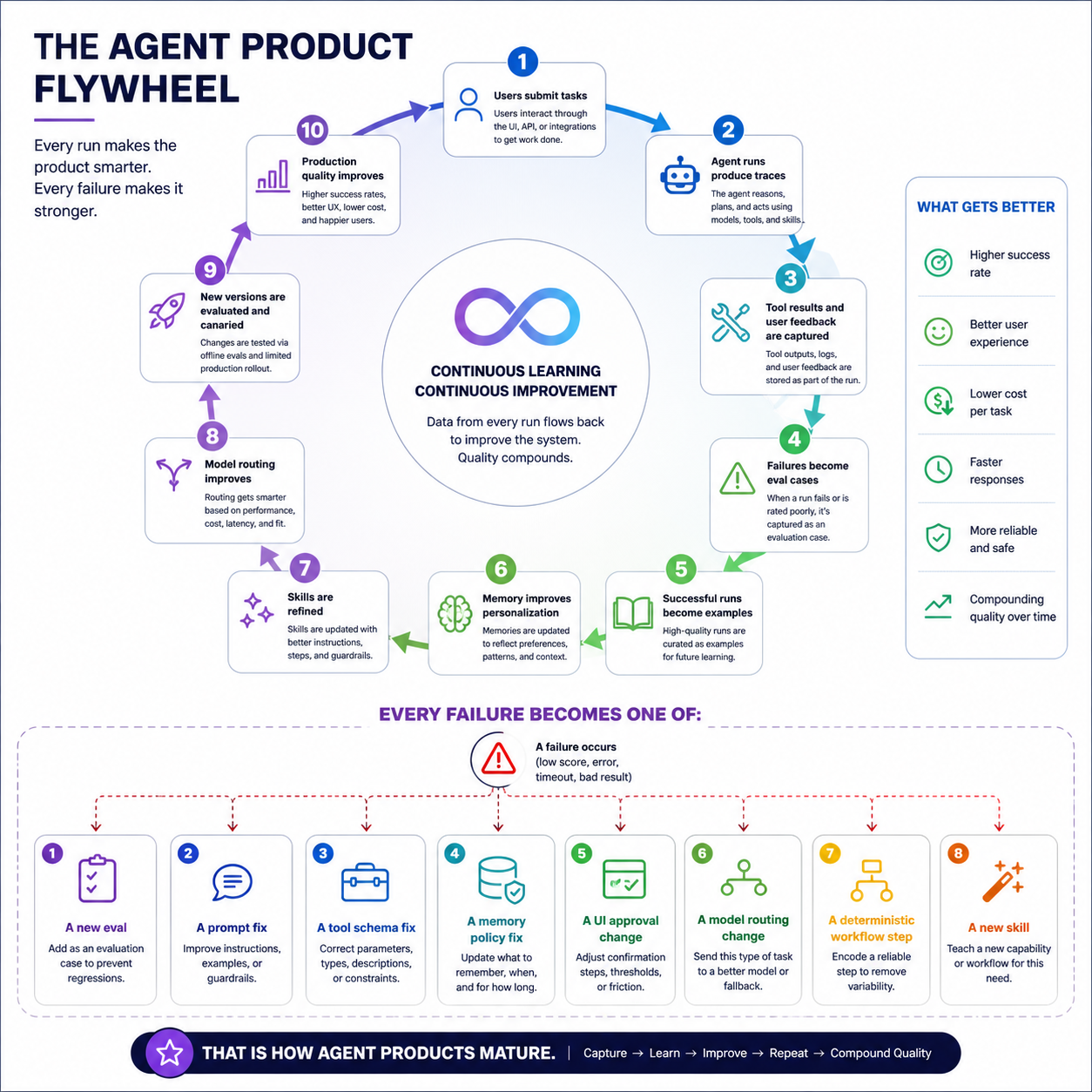
Every failure should become one of:
- A new eval
- A prompt fix
- A tool schema fix
- A memory policy fix
- A UI approval change
- A model routing change
- A deterministic workflow step
- A new skill
That is how agent products mature.
12. A Practical Build Roadmap
Here is a realistic roadmap for building the full stack.
12.1 MVP Agent Product
Build:
- One product surface: web, CLI, or API
- Basic auth
- Run table
- Message history
- One model provider
- Small set of tools
- Basic tool-call logging
- Manual approval for risky tools
- Simple eval set
Avoid:
- Multi-agent complexity
- Full autonomy
- Too many tools
- Unbounded memory
- Provider-specific lock-in
Your first goal is not maximum intelligence. It is controlled usefulness.
12.2 Durable Context
Add:
- Checkpoints
- Resume
- Event log
- Idempotency keys
- Tool invocation table
- Queue-based workers
- Retry/backoff
- Human approval state
- Artifact storage
At this point, the system can survive interruption.
12.3 Memory Intelligence
Add:
- Memory records
- Memory scopes
- Memory retrieval
- Memory write pipeline
- User memory controls
- Confidence and source attribution
- Memory evals
Avoid injecting all memories into every prompt.
12.4 Tool Platform
Add:
- Tool registry
- MCP connector
- Custom API tools
- Skills
- CLI sandbox
- Tool policies
- Tool result normalization
- Tool-level observability
This turns tools into governed product capabilities.
12.5 Model Router and AI Infra
Add:
- Model gateway
- Provider fallback
- Small model routing
- Specialized model calls
- Self-hosted model path, if justified
- Prompt/model versioning
- Cost attribution
This gives you control over cost, latency, and quality.
12.6 Evaluation and Observability Platform
Add:
- Golden evals
- Regression evals
- Tool-use evals
- Resume evals
- Memory evals
- Online feedback
- Trace replay
- Canary releases
- Dashboards
At this point, you can improve systematically.
13. Reference Architecture Blueprint
A production deployment might look like this:
Clients
├── Web app
├── Mobile app
├── CLI
├── API clients
└── MCP clients/servers

Gateway
├── Auth
├── Rate limits
├── Tenant boundary
├── Request validation
└── Billing metadata

Agent App Service
├── Run creation
├── User events
├── Streaming
├── Approvals
├── Notifications
└── Artifact UI

Context Layer
├── Run DB
├── Event log
├── Checkpoint store
├── Memory store
├── Vector index
├── Object store
├── Graph/SQL/KV context
└── Policy context

Agent Runtime
├── Planner
├── Router
├── Prompt/context assembler
├── Stateless loop
├── Reflection
├── Output composer
└── Multi-agent coordinator, optional

Tool Layer
├── MCP connector
├── Custom API tools
├── Skills
├── CLI tools
├── Sandbox/executors
├── Tool registry
├── Tool policy
├── Tool auth
└── Tool audit

AI Infra
├── Model gateway
├── Frontier provider router
├── Self-hosted LLM serving
├── Small model serving
├── Specialized models
├── Embeddings
├── Rerankers
├── Prompt cache
└── Cost tracking

Traditional Infra
├── Queues
├── Workers
├── Caches
├── Databases
├── Object storage
├── Secrets
├── CI/CD
├── Observability
└── Security/compliance
The key dependency direction:
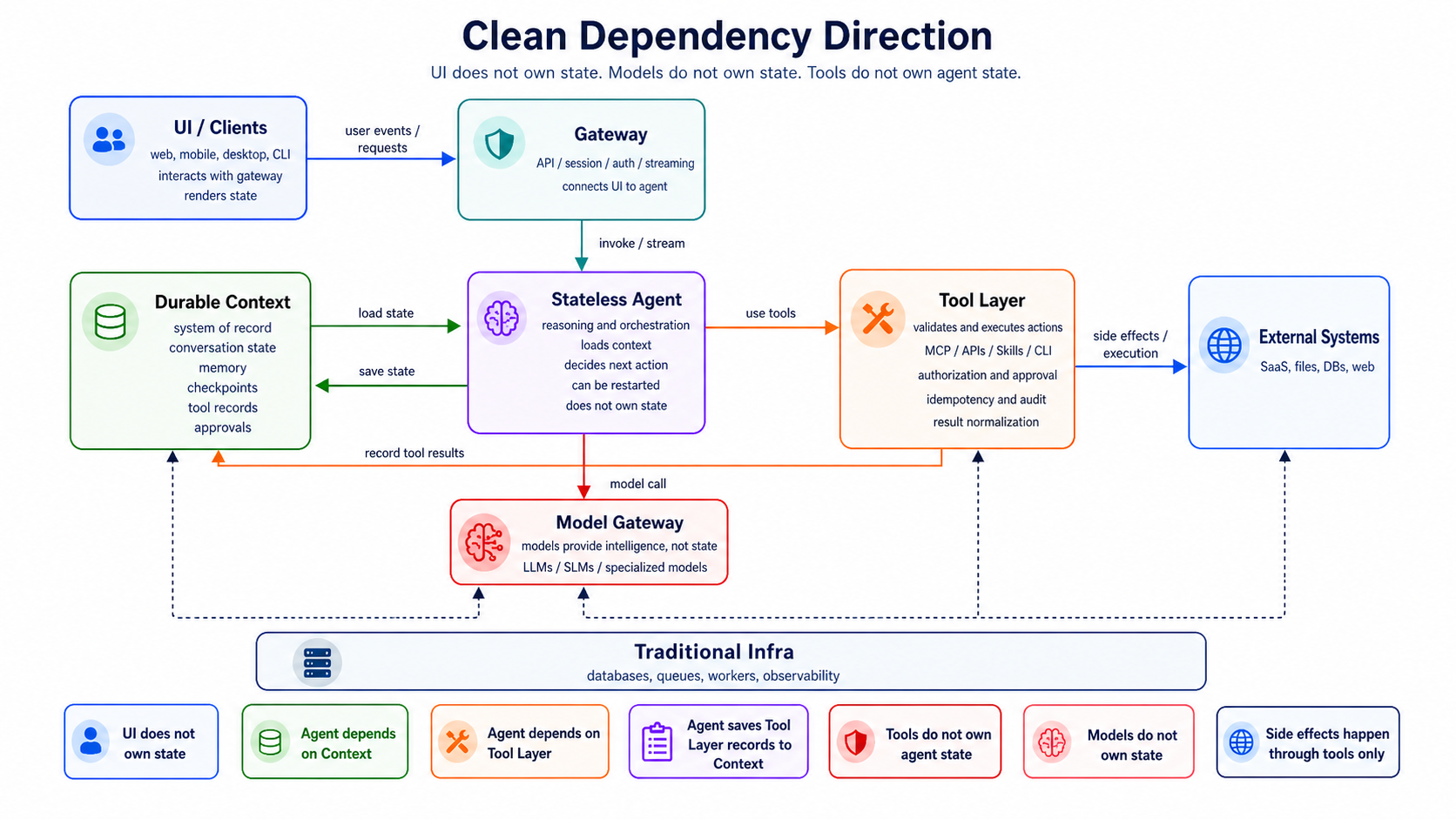
That keeps the architecture clean.
14. Production Design Principles
- Externalize state. Never make the agent worker the stateful brain. The durable brain is the context layer.
- Make every step observable. Trace context retrieval, model calls, decisions, tool calls, checkpoints, memory writes, approvals, and final outputs.
- Treat tools as dangerous until proven safe. Every tool needs schema, auth, policy, timeout, idempotency, and audit.
- Prefer skills over free-form chaos. Reusable skills are easier to evaluate than arbitrary agent behavior.
- Separate reasoning from execution. The model proposes. The tool layer disposes.
- Design for interruption. Assume the process dies after every line of code. If the system can resume safely, it is production-grade.
- Make evals release gates. No major model, prompt, tool, or memory-policy change should ship without evals.
- Keep model upgrades pluggable. Stable interfaces let the product improve as models improve.
15. Common Anti-Patterns
- The prompt is the product. A prompt is not a product. A product needs auth, state, tools, memory, evals, observability, and recovery.
- Stateful agent workers. If the process owns the state, crashes become unrecoverable.
- Memory as prompt stuffing. Memory should be retrieved, ranked, scoped, and permissioned.
- Tool calls without idempotency. This causes duplicate emails, duplicate tickets, duplicate payments, and broken trust.
- No human approval layer. High-risk tool calls need explicit control.
- No evaluation suite. Without evals, every improvement is subjective.
- Direct shell access. CLI tools must run in a sandbox with limits and logs.
- One model for everything. Use the right model for the step.
- Observability as an afterthought. Agent traces should be designed from day one.
16. Final Mental Model
A production agent product is a distributed system where an LLM is one component.
The product surface gives users control.
The context layer gives the system memory, durability, and resumability.
The stateless agent layer gives the system reasoning and orchestration.
The tool layer gives the system action.
The AI infrastructure gives the system model intelligence at the right cost and latency.
The traditional infrastructure gives the system reliability.
Evaluation and observability give the system the ability to improve.
The architecture to remember is:
User Surface
  -> Gateway
  -> Durable Context
  <-> Stateless Agent
  <-> Governed Tools
  -> External Systems

All backed by:
  model routing,
  inference serving,
  databases,
  queues,
  observability,
  evaluation,
  security,
  and cost control.
The agent of the future is not just a smarter model.
It is a better engineered system around the model.